What's new · August 2026
August 2026
We've added shared ModelDaemon pools, a QA agent that explores your app, and regression checks that re-run earlier milestones' tests.
We've added shared ModelDaemon pools, a QA agent that explores your app, and regression checks that re-run earlier milestones' tests.
- Review and validation, in one place
- A QA agent that actually explores your application
- Knowledge that finds itself
- Every milestone re-checks the ones before it
- See a finished migration before connecting anything
- Set up a project together
- ModelDaemon pools
- Organizational Knowledge: automatic tagging and item-level import
- Smaller things worth knowing
Review and validation, in one place
Code Review is no longer only about issues. The milestone's test results now live alongside them, under a Validation tab split into API/CLI, UI Tests, QA Agent, and Lifecycle.
Every result has a Discuss button that drops it straight into the review chat. Instead of describing a failure to the agent, you hand it the failure.
Failures that opened a review issue now link both ways, so you can get from a red test to the issue tracking it, and back.
A QA agent that actually explores your application
Frontend validation used to be one agent writing and running browser tests. It is now two, with different jobs.
A QA agent explores your migrated application the way a person would, capturing what it finds side by side against the original. A separate test agent then writes and runs the automated suite from that report.
The practical difference is coverage you did not have to specify. The QA agent finds the screens and flows that matter by looking, rather than only testing what someone thought to describe, and its paired before-and-after evidence is often the most convincing artifact in a migration review.
Knowledge that finds itself
Once your Project Spec is approved, Morph reads it and searches your organization's knowledge for anything worth reusing on this project, based on what the migration intends to do, not only on which repositories happen to match.
The result arrives as a selection during onboarding, with the best matches marked Recommended. You choose what to bring in.
This is where the second migration starts costing less than the first. Lifecycle knowledge, conventions, and hard-won corrections from earlier projects show up at the beginning instead of being rediscovered.
Knowledge import is also no longer restricted to projects that share repositories with yours. The whole organizational pool is available, with relevance driving what gets recommended. Hover a Recommended tag to see why an item was suggested.
Every milestone re-checks the ones before it
From the second milestone onward, the functional tests accumulated from all previous milestones run as a regression suite after the current milestone's own tests.
This is what keeps a long migration honest. Work landing in milestone 8 cannot quietly break behavior that was proven in milestone 2 without you hearing about it. A regression failure is surfaced rather than blocking, because the right fix may belong to either milestone.
See a finished migration before connecting anything
There is now a read-only sample project: a real modernization, replayed end to end across twelve steps, reachable from the sign-in screen without connecting a repository.
Chat replays the actual conversation recorded during that migration, so you can see how the agent was directed rather than just the outcome. Nothing writes to any account.
It is the fastest way to judge fit, and the easiest thing to send to a colleague who wants to understand the product without starting a trial.
Set up a project together
Project setup is now a shared activity rather than a solo one. Setup is held by one person at a time, and that person can hand over to a teammate, with the new owner notified by email.
Onboarding often needs two kinds of knowledge that rarely sit with the same person: what the application does, and how it builds. Now the person who knows the build can take the build environment step and hand it back.
ModelDaemon pools
Self-hosted daemons are now organized into pools: shared groups of machines that serve one or more projects. A team's build capacity belongs to the team, so nobody waits on one specific person's machine.
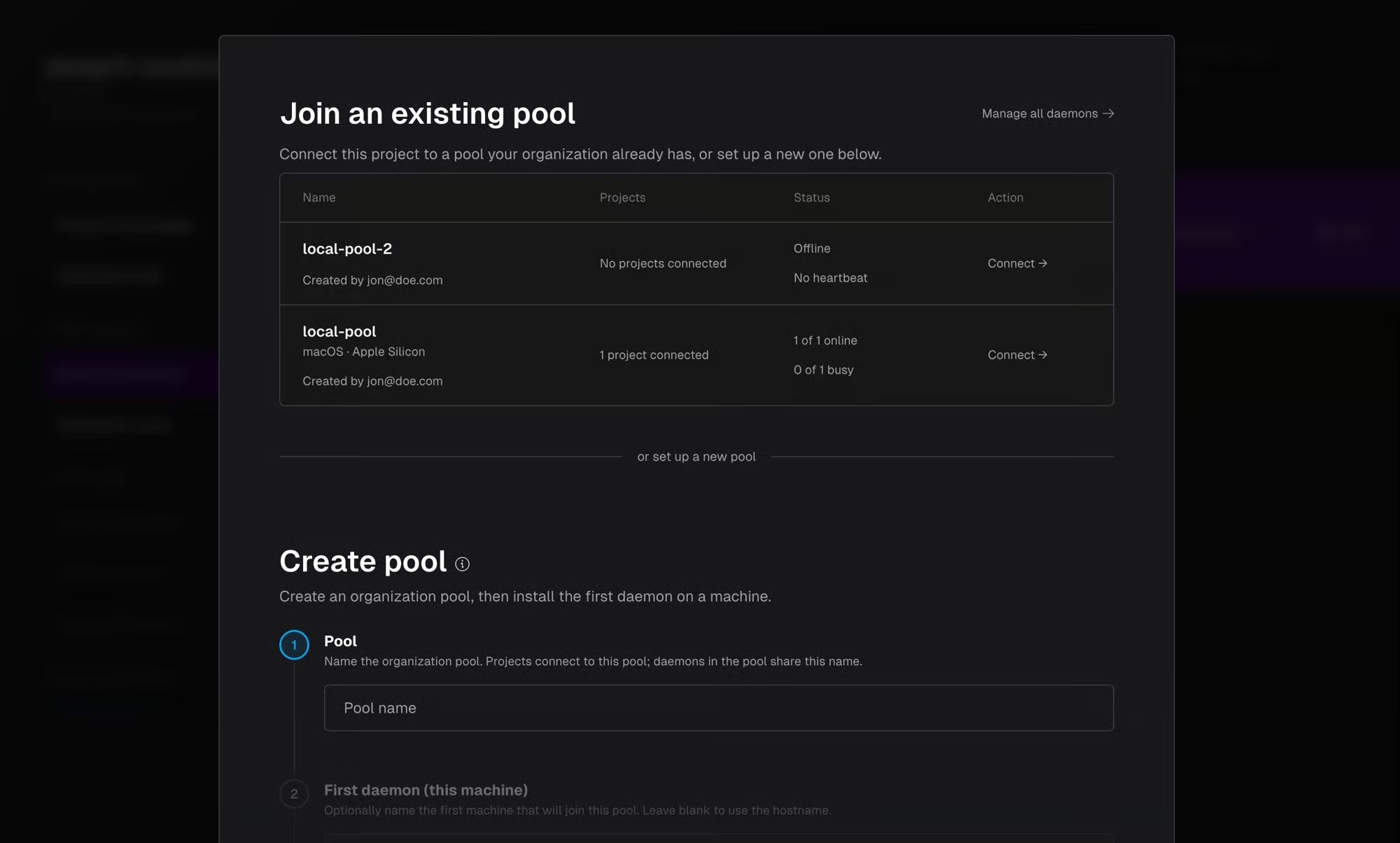
Any member of your organization with access to a project can now run work on that project's pool, so most people never need to install anything. One person sets up the pool, and the whole team uses it.
If you already have self-hosted daemons, existing daemons were converted into pools automatically, with no change to how your projects behave.
- Add a machine, get more capacity: adding a daemon to a pool increases capacity for every project connected to it, and Morph routes each piece of work to an available machine automatically.
- One pool can serve several projects at once, and each pool declares its operating system and architecture so work only lands on a machine that can run it.
- Join a pool instead of building one: when setting up a self-hosted build environment, join an existing pool or create a new one. Creating one generates the install command for your platform, then Verify & Continue confirms the daemon is connected.
- See what your pool is doing: the Roadmap sidebar shows how many machines are online, what is running, and each daemon's Idle or Busy status. A full pool is reported instead of silently queueing.
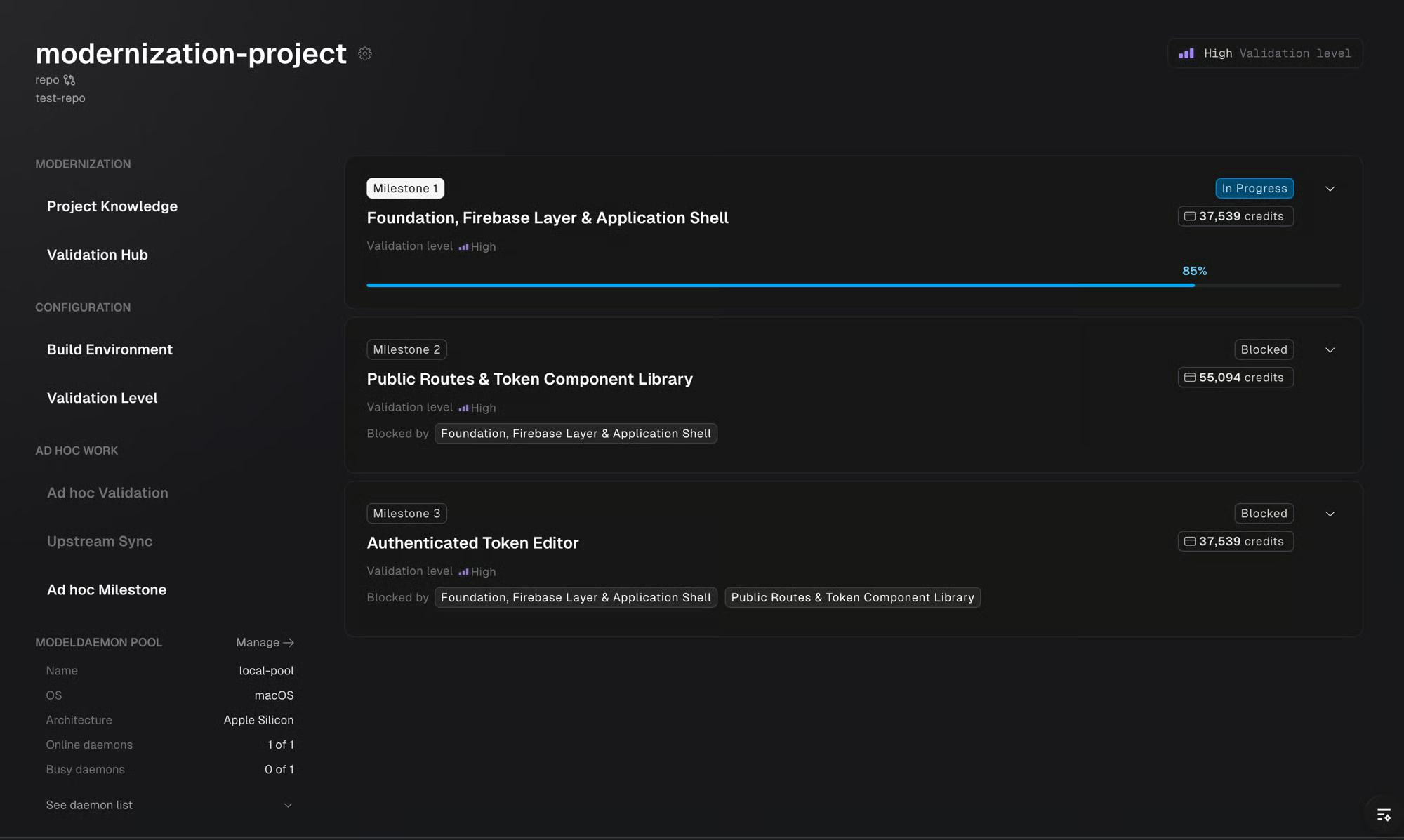
- Chat is never blocked by a busy pool: Knowledge chat and Code Review chat are exempt from pool capacity limits.
Organizational Knowledge: automatic tagging and item-level import
Project artifacts, including lifecycle scripts, dependencies, acceptance criteria, instructions, project configuration, and wikis, are now automatically tagged with their associated repositories as projects are set up, making them discoverable as organizational knowledge with no manual export step.
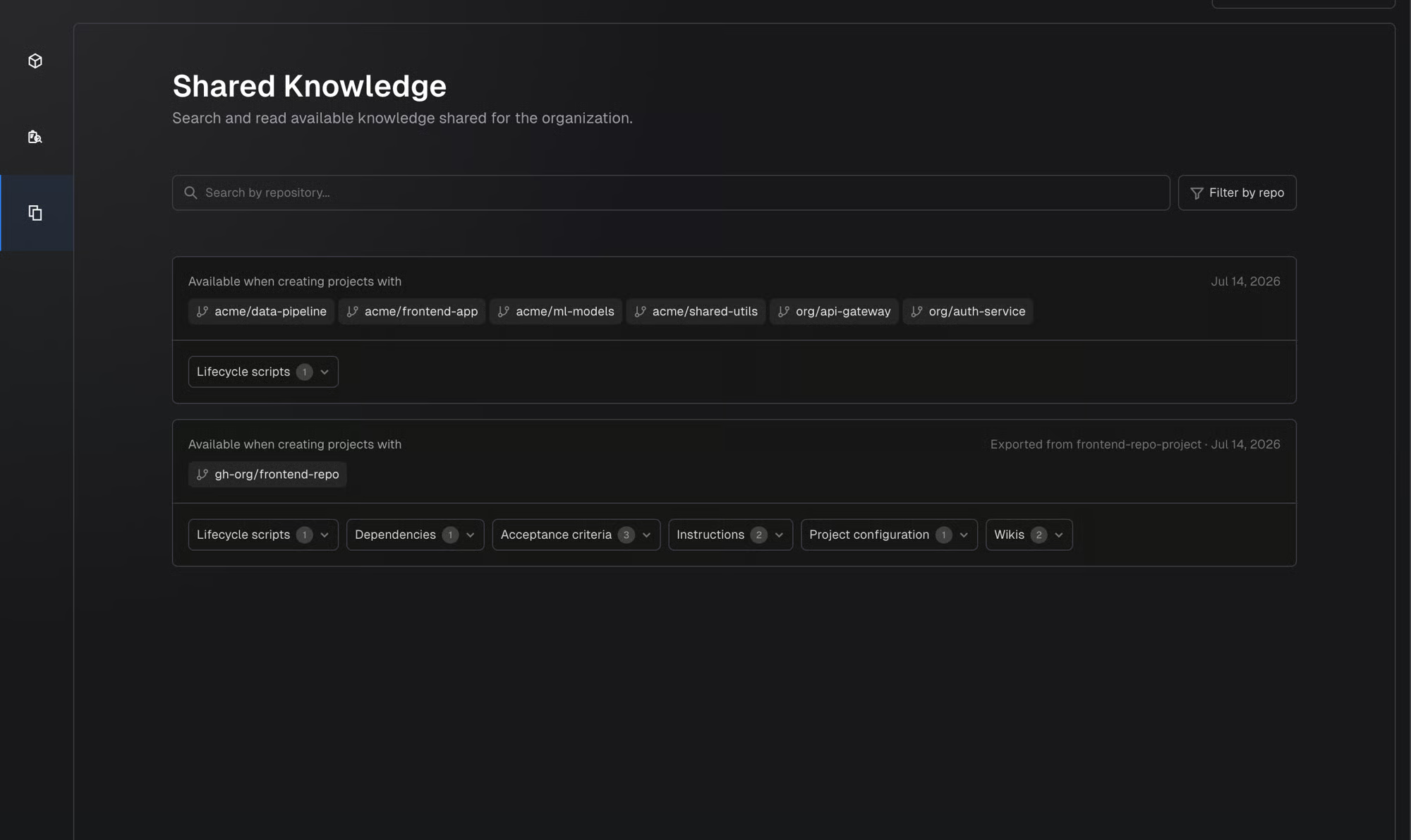
The Organizational Knowledge page gives you a centralized view of all knowledge across your organization, with filtering by repository and source project.
- Import specific items, not everything: when creating a project, or later from the Roadmap sidebar, selectively import items from the organizational knowledge pool.
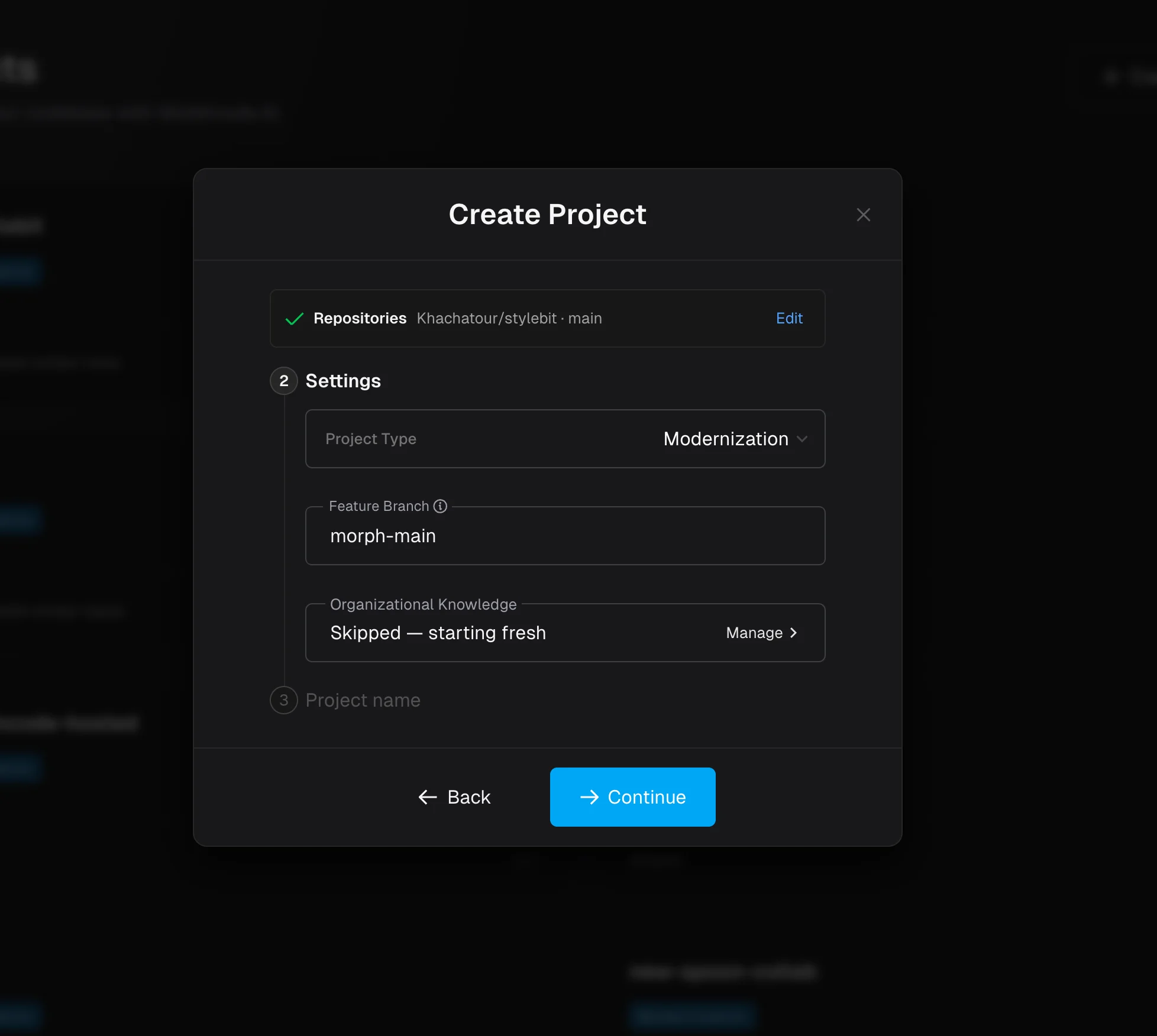
- Click Manage in the Organizational Knowledge section of the create project form to browse, search, and filter items by artifact type. The most relevant are marked Recommended, and nothing is selected for you.
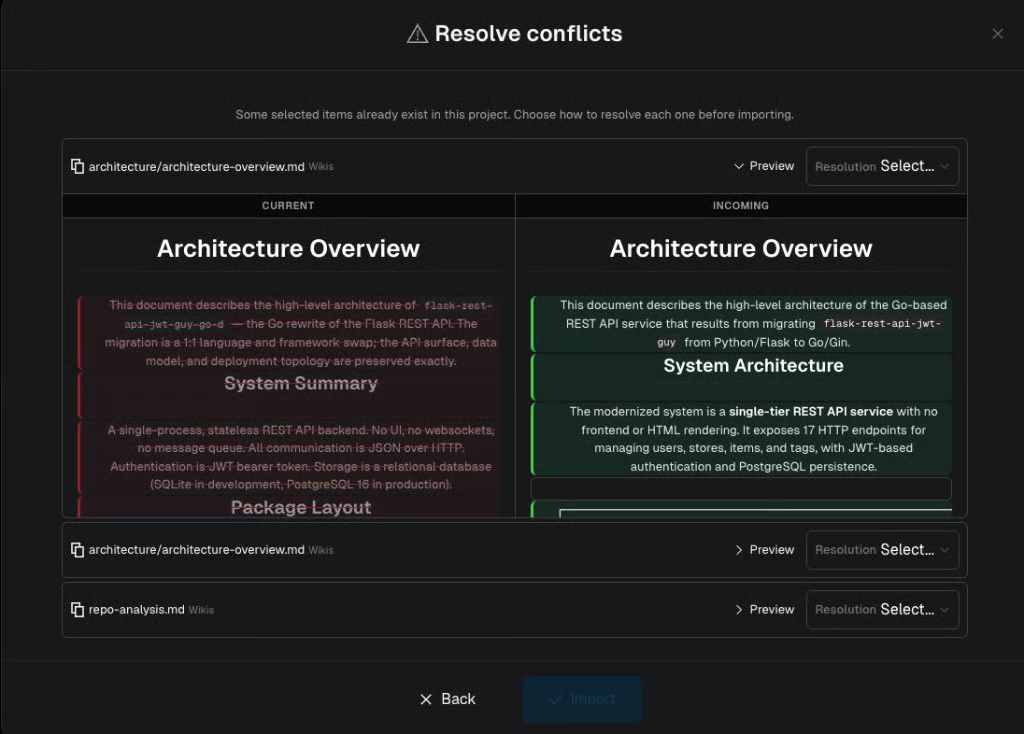
- From the Roadmap sidebar, Import Knowledge shows the full pool. Items that already exist in the project surface a conflict step where you choose to replace, keep both, or skip.
Smaller things worth knowing
Quality-of-life updates across setup, validation, and team management.
- Validation that means something: a smoke script is now part of validating your original application. A health check proves a process is listening; a smoke test proves the application works. Until one passes, a lifecycle is not treated as validated.
- Database seeding is its own step: a new seed_db script separates preparing data from starting the application, so Morph can restart your app without re-seeding it each time.
- Closing a pull request finishes the milestone: closing a milestone's PR without merging now completes it. To get different code, use review chat or an ad hoc milestone.
- Copyable invite links: creating a user or invitation now gives you a link you can send directly.
- Seat visibility: the Members screen shows how many seats are in use, and tells you what to do when they are all taken.
- The Validation Hub works at every level, including Low. Your lifecycle results still tell you whether the application installs and builds.